Arduino Examples
Let's take a closer look at a few of the examples included in the SparkFun BMI330 Arduino library.
Example 01 - Basic Readings I2C
The first example shows how to get acceleration, angular rate and temperature data from the BMI330 over I2C with default settings. The BMI330's default measurement ranges are ±2g and ±2000°/s. The example adjusts the ranges to ±4g and ±500°/s to work with general handheld motion. Open the example by navigating to File > Examples > SparkFun BMI330 Arduino Library > Example01_BasicReadingsI2C.
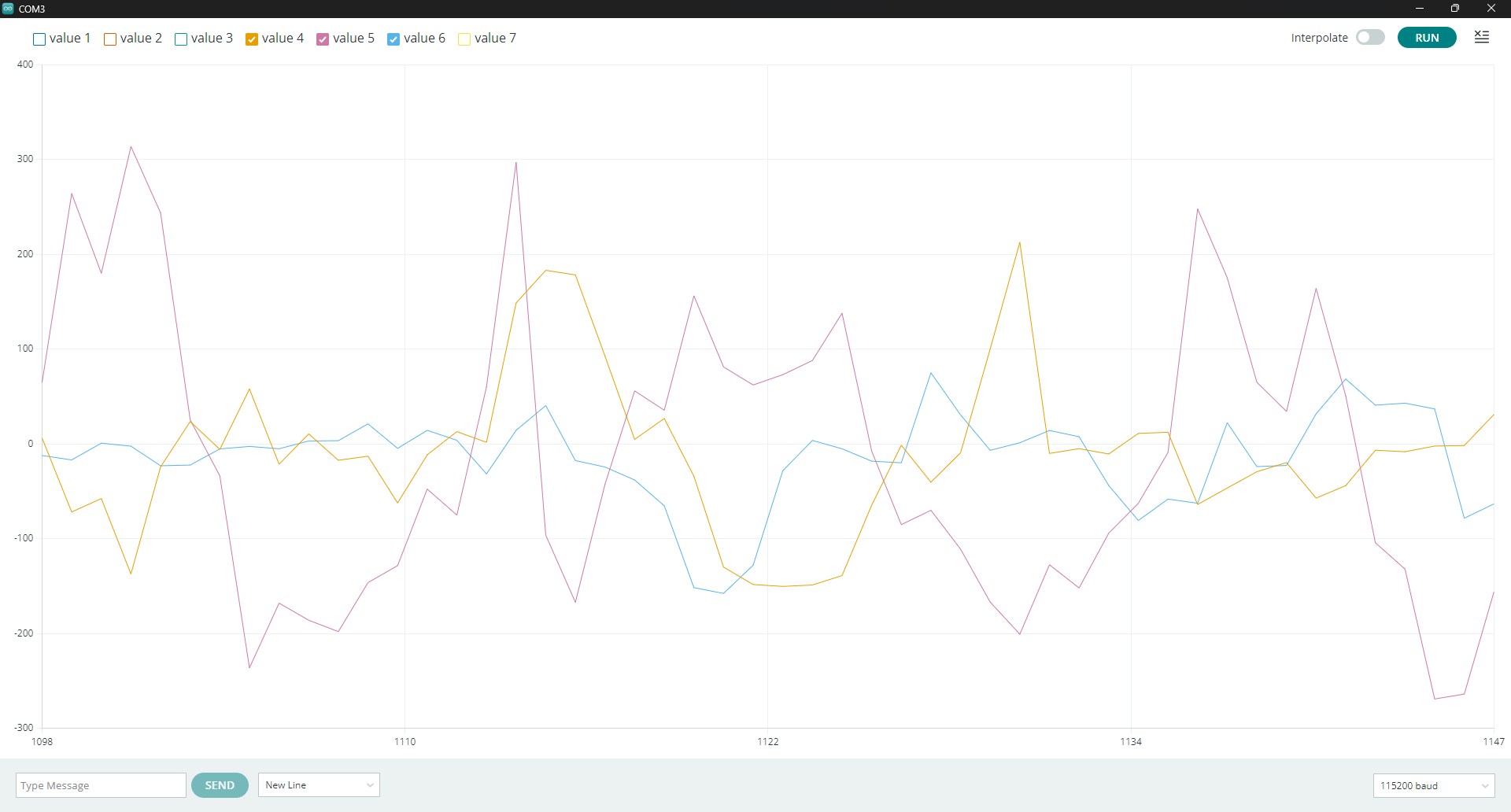
Select your Board and Port and click the "Upload" button. After the code finishes uploading, open the serial monitor with the baud set to 115200 and you should see values for the x, y and z axes for both sensors print out every 100ms. Try shaking and tilting the sensor and you should see the values change. For a more visual representation of the data, try opening the serial plotter and moving the sensor. With six lines of data, it may be a bit busy so try disabling a few values (1-3 are accelerometer data, 4-6 are gyroscope data) for a clearer picture of the measured motion. The screenshot below shows a few seconds of gyroscope data while rotating the sensor:
Example 03 - Configuration
The third example goes through several of the BMI300's configuration settings to demonstrate the positives and negatives of each setting. The example does this by cycling through several settings and prints the noise measured in each setting. The settings it steps through are acceleration range, output data rate (ODR), bandwidth and averaging. Let's take a closer look at each of these settings:
-
Range - The range output is 16-bit that spans the entire selected range so the values halve each time the range doubles. This means lower ranges have higher sensitivity (16384 LSB/g at ±2g all the way to 2048 LSB/g at ±16g) but once measurement exceeds the range it clips and data is unusable.
-
ODR - Output Data Rate is fairly straightforward. The BMI330 has a wide range of data rates, some of which can only be used in specific modes. Higher rates mean more power required and more noise per sample.
-
Bandwidth - Related to ODR, this is the low-pass cutoff for samples.
-
Averaging - Averages N samples on the hardware. Noise falls as a √N (64x averaging is 8x quieter) and the output data rate remains static so this helps reduce the hosts processing time. It does raise the sensor's internal sample rate and increases the BMI330's current draw.
One last important thing to note about this example is setting an "illegal" ODR and power mode pairing (for example 6400Hz in low power mode) does not cause a register write fail. It sets "acc_conf_err" or "gyr_conf_err" in ERR_REG.
Example 04 - Data Ready Interrupt
[!NOTE] The following several examples all use one or more of the BMI330's interrupt pins. If you're not familiar with using interrupts in Arduino, you may want to read through their documentation on them here. The examples default to work with a RedBoard Plus and attach INT1 to
D2and INT2 toD3. If you're using a different microcontroller, you'll want to refer to your board's documentation or the table for common interrupt pins on this page and then adjust the code to the correct pin number. To change the assigned interrupt pin, look for the line similar toconst uint8_t kInterruptPin = 2;at the beginning of each of the interrupt examples.
Example 4 shows how to take one read per sample, as opposed to polling the sensor continuously like the previous examples. This example uses INT1 on the BMI330 and configures the interrupt's pin behavior, latch mode and routing. All of the BMI330's smart motion features use one or more of the interrupts so it's important to know how to properly configure them for your desired results.
The example defaults to enable INT1 as a push-pull, active high signal with the following lines:
    sfe_bmi330_int_pin_config_t pinConfig;
    pinConfig.enabled = true;
    pinConfig.activeHigh = true;
    pinConfig.openDrain = false;
    myIMU.setInterruptPinConfig(BMI330_INT1, pinConfig);
The latch mode can be set to either pulsed (Default) or latched. Pulsed mode briefly pulses the interrupt per event where latched mode holds it until the status register is read. You can adjust this setting by changing the following line to true:
myIMU.setInterruptLatch(false);
Finally, the setup tells the code to only route accelerometer data-ready signals to INT1. The gyroscope runs at the same rate so we only need one route for the interrupt to work for both.
myIMU.mapInterrupt(BMI330_INT_SRC_ACCEL_DRDY, BMI330_INT1);
Example 05 - FIFO Buffer
This example shows how to use the BMI330's FIFO buffer and trigger an interrupt when it has enough samples to send to the microcontroller. Using the FIFO buffer this way lets you sample at 400 Hz without the host device handling 400 interrupts a second, allowing the host to sleep between data bursts. This sketch configures the FIFO for accelerometer, gyroscope and sensor time, sets a watermark, routes the watermark interrupt to INT2, and decodes frames when it fires.
Example 06 - Wake On Motion
The sixth example demonstrates the BMI330's Wake on Motion smart motion feature. This feature is particularly helpful for battery-powered designs as it lets the BMI330 run in suspend mode, wake to run at full rate while something is happening and then return to suspend when it stops. This feature uses both interrupt pins, one to fire when the board starts moving (anyMotion) and the other to fire when it returns to rest after a set period of time (noMotion).
The example sets the settings for anyMotion to roughly 160mg of slope for a sustained period of 200ms. The values here are the hardware's, not SI so refer to the notes at the top of the example or the datasheet for more information. You can change these values by adjusting the setup for anyMotion:
    sfe_bmi330_motion_config_t anyMotion;
    anyMotion.slopeThreshold = 100; // 100 x 1.953 mg = 195 mg
    anyMotion.duration = 10;        // 10 x 20 ms = 200 ms
    myIMU.setAnyMotionConfig(anyMotion);
The settings for noMotion define it to be ~39mg of slope for a full two seconds.
    sfe_bmi330_motion_config_t noMotion;
    noMotion.slopeThreshold = 20; // 20 x 1.953 mg = 39 mg
    noMotion.duration = 100;      // 100 x 20 ms = 2000 ms
    myIMU.setNoMotionConfig(noMotion);
Example 07 - Tap Detection
Example 7 shows how to use the BMI330's tap detection feature. This feature detects single, double and triple taps all on the BMI330 and then signals to the host what gester it measured. The two important settings for tap detection are the tap axis and the tap threshold. Tap axis defines which direction the BMI330 watches for tap events. The BMI330 only watches the tap axis and ignores any motion on the other two. The threshold defines how much motion to trigger a tap event. If this is too low, small vibrations like footsteps near the sensor can trigger it. If it's too high, nothing does.
The code configures the BMI330 to watch for taps on the Z-axis. You can switch to one of the other two axes by adjusting this line:
const sfe_bmi330_tap_axis_t kTapAxis = BMI330_TAP_AXIS_Z;
If you'd like to adjust the tap configuration settings such as tap mode, threshold or gesture/quiet times you can change any of the following settings. For example, if stray taps appear, you can switch the peakThreshold setting to a higher hexadecimal value.
    sfe_bmi330_tap_config_t tap;
    tap.axis = kTapAxis;
    tap.mode = 1;                  // 0 sensitive, 1 normal, 2 robust.
    tap.peakThreshold = 0x2C;      // The knob to tune. Raise it if stray taps appear.
    tap.maxPeaksForTap = 5;
    tap.maxGestureDuration = 0x11; // 340 ms for the whole gesture.
    tap.maxDurationBetweenPeaks = 5;
    tap.shockSettlingDuration = 5;
    tap.minQuietBetweenTaps = 7;   // 140 ms of quiet required between taps.
    tap.quietTimeAfterGesture = 5;
    tap.waitForTimeout = true;     // Report the confirmed gesture, not the first thing seen.
    myIMU.setTapConfig(tap);
After configuring everything, the main loop performs simple serial prints for the tap event detected by the BMI330, either Single, Double or Triple.
Example 08 - Step Counter
This example shows how to use the BMI330's integrated step detector and step counter features. The BMI330 counts steps on its own and the host can poll the count, be interrupted every N steps or interrupted every single step. The step counter keeps a 32-bit count on the BMI330 and interrupts at a watermark in units of 20 steps. The step detector interrupts at every step. This example enables both of these features so you can watch every step measured (on INT1) along with a watermark every 20 steps (on INT2).
After uploading it, open a serial monitor with the baud set to 115200. The code initializes it and then prompts to carry the board and begin to walk to allow the algorithm a few warm up paces before it starts counting.
Example 09 - Tilt Orientation Flat
The ninth example demonstrates the BMI330's posture features: tilt, orientation and flat. These all use the accelerometer to detect which direction the board is pointing. Tilt is useful for detecting the change in the gravity vector from a slowly-updated reference. Think of this as the "has this been knocked over?" feature. Orientation classifies the board position as "portrait" or "landscape" (and optionally face up or face down) and interrupts on a change. Think of portrait and landscape classification as how your phone screen rotates its display.. Flat fires when the board remains within a set angle of horizontal for a set period of time.
One other important factor to note is "Blocking". Each of the features here have a blocking setting to suppress detection during motion since gravity cannot be reliably measured during motion. Higher blocking returns fewer false reports but a slower response where lower blocking is the opposite. The example attempts to set blocking to a reasonable middle.
The example sets up the tilt to report when the accelerometer detects a change of roughly 35 degrees from the reference vector. You can change the tilt settings by adjusting these lines:
    sfe_bmi330_tilt_config_t tilt;
    tilt.segmentSize = 100;   // 2 s of averaging into the reference vector.
    tilt.minTiltAngle = 210;  // ~35 degrees.
    myIMU.setTiltConfig(tilt);
The code sets up orientation to enable potrait/landscape and face up/down with aggressive blocking to ignore everything while moving:
    sfe_bmi330_orientation_config_t orientation;
    orientation.faceUpDownEnabled = true;
    orientation.mode = 0;       // Symmetrical.
    orientation.blocking = 3;   // Most aggressive - ignore everything while moving.
    orientation.theta = 40;
    orientation.holdTime = 5;   // 100 ms of stability before reporting.
    myIMU.setOrientationConfig(orientation);
Lastly, flat is enabled to trigger within ~8 units of horizontal for just over half a second:
    sfe_bmi330_flat_config_t flat;
    flat.theta = 8;
    flat.blocking = 2;
    flat.holdTime = 32;
    myIMU.setFlatConfig(flat);
The main loop watches all three of these interrupt flags and prints out whenever a posture interrupt fires.